
Golf Live App
Get Better at Golf—From Anywhere
At Dennis Wells Golf, I’m all about making improvement simple: identify what matters most, fix it with the right drills, and build a plan you can actually follow.
Now you don’t have to live nearby to work with me.
I’m excited to offer virtual lessons and swing analysis through Golf Live—so you can get expert coaching from anywhere, using only your phone.
What makes Golf Live different?
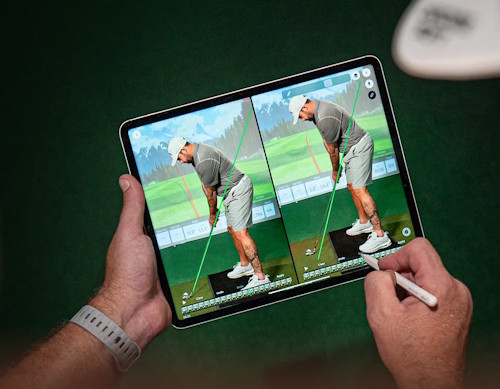
- Live swing replay: I can record your swing during the lesson, draw right on the video, and replay it instantly so you can see and feel the change.
- Feedback in the moment: No waiting days for a response—you get answers while you’re practicing, which leads to faster improvement.
- All your lessons saved: Every session is stored in your app, so you can rewatch your drills and key points whenever you need them.
How to Work With Me on the Golf Live App
We’ll use the Golf Live app for virtual lessons and swing analyses. It keeps everything in one place—lesson videos, notes, and your progress—so you can rewatch and practice with confidence between sessions.
Step 1 — Download & Create Your Golf Live Account
- Download Golf Live from your phone’s app store.
- Open the app → Sign Up → Sign Up With Email.
- Choose Golfer → Continue.
- Enter your name, email, and password.
- Verify your email when prompted.
- (Optional) Fill out your profile (skill level/handicap/goals).
If I add you to a private plan, you may receive a temporary password + email verification instructions first.
Help: Create a golfer account
Help: Private plan invite info


Step 2 — Book a Virtual Lesson
- Open the app → Coaches.
- Select my coach profile or go directly to my profile by selecting this link
- Tap Offerings and choose your lesson.
- Tap Schedule.
- Request your date/time and duration → Confirm.
- I’ll confirm the time (or suggest an alternate). You’ll get a notification once it’s set.
Help: How to book a lesson
Step 3 — Request a Swing Analysis
- Open the app → Coaches → select my profile.
- In Offerings, choose Swing Analysis → Request.
- Upload 1–2 swing videos.
- Add a note (super helpful): your miss, goal, and what you’ve tried.
- Tap Request Analysis and complete checkout.
- Your request will show as Pending until I deliver your analysis.
Step 4 — How to Record Videos (So I Can Coach You Faster)
Quick tips:
- Record in vertical (portrait)
- Use the rear camera when possible
- Use a tripod or stable surface
- Keep your full body + entire club in frame
- Good lighting helps (avoid filming into bright light)
Best angles:
- Face-On: camera facing your chest, about waist-high
- Down-the-Line: camera behind you aligned with target line, about hand-high
Step 5 — Rewatch Lessons & Notes
- Open the app → Lessons → Past.
- Select your completed lesson to rewatch videos and review coaching notes.
Help: Rewatch past lessons
What to Send Me (so I can help you immediately)
For a Virtual Lesson
Please message/send:
- Your typical score or handicap
- Your main miss (slice, pull, chunk, thin, etc.)
- Your #1 goal for the next 30 days
- If possible: Face-On + Down-the-Line videos of:
- 1 mid-iron (7/8 iron is perfect)
- 1 driver (optional if driver is the focus)
For a Swing Analysis
Please include:
- 2 angles if you can (Face-On + Down-the-Line)
- Which club you’re using
- Your miss + desired ball flight
- Any injury/limitations (if relevant)
- A quick note: “My biggest frustration is ______.”
For Juniors (parents/juniors)
Please include:
- Junior’s age
- What they’re working toward (fun, team golf, tournament play)
- 5 swings with a mid-iron (Face-On + Down-the-Line if possible)
Quick Fixes
Need Help?
Golf Live Support: support@golfliveapp.com
Include your device type (iOS/Android) + a screenshot of any error message.